
Download EPUB Viewer – Fast, Free & Secure EPUB Reader & Converter
Overview
EPUB Viewer by Enolsoft is a lightweight yet powerful desktop program designed to simplify the way you open, read, and edit EPUB documents. Whether you are a casual reader who wants a clean interface for digital books, a student handling multiple textbooks, or an author needing to preview and tweak EPUB files before publishing, this tool offers a complete solution. The application supports drag‑and‑drop opening, instant zoom controls, bookmarking, and direct printing, making everyday reading tasks effortless.
One of its standout capabilities is the built‑in conversion engine that transforms EPUB files into high‑quality PDFs with a single click, preserving layout, embedded images, and multimedia elements. Speaking of multimedia, EPUB Viewer can handle embedded audio, video, and other rich media, ensuring that interactive e‑books render exactly as intended. Its tabbed interface lets you work with several EPUBs simultaneously without cluttering your screen with multiple windows.
The user interface is intentionally minimalistic; you can start reading right after launch without a steep learning curve. Security‑focused updates are released regularly, guaranteeing that the software stays compatible with the latest operating system patches and that your reading experience remains safe from vulnerabilities. In short, EPUB Viewer is the go‑to free tool for anyone looking to manage EPUB files efficiently while enjoying modern reading comforts.
Key Features & Benefits
- Instant drag‑and‑drop opening of EPUB files.
- Zoom in/out with smooth scaling for comfortable reading.
- Bookmark current pages for quick return.
- Print EPUB documents directly from the app.
- Convert EPUB to PDF while preserving layout and multimedia.
- Support for embedded audio, video, and interactive media.
- Tabbed browsing – handle multiple EPUBs in one window.
- Simple, clean UI that works out‑of‑the‑box.
- Regular free updates for security and compatibility.
- Lightweight installation – under 15 MB.
Why These Features Matter
For readers, the drag‑and‑drop mechanism eliminates the tedious process of navigating file dialogs; you simply drop an EPUB onto the window and start reading. The zoom controls adapt to different screen sizes, from high‑resolution monitors to low‑pixel laptops, ensuring text stays crisp without straining the eyes. Bookmarking is essential for long‑form content such as novels or academic textbooks, letting you pick up exactly where you left off. Printing is often overlooked in e‑book readers, yet students and professionals sometimes need hard copies for annotation; EPUB Viewer delivers a clean printout without extra software.
The built‑in converter addresses a common pain point: many e‑readers or printers do not support EPUB natively. By turning an EPUB into a PDF, you gain universal compatibility while retaining the original design, fonts, and embedded media. Speaking of media, modern EPUBs frequently contain audio narrations, video clips, or interactive quizzes. EPUB Viewer decodes these elements seamlessly, preserving the author’s intent and enriching the reading experience.
Tabbed browsing is a productivity booster. Instead of juggling several program windows, you can switch between books or reference manuals with a single click, keeping your desktop tidy. The minimalist UI means you spend less time learning menus and more time reading. Finally, the free, regular updates guarantee that security patches and OS compatibility tweaks are delivered promptly, so you can trust the software with your personal library.
Pros & Cons
- Pros:
- Free and lightweight – no hidden fees.
- Fast opening and smooth rendering.
- Robust PDF conversion with multimedia support.
- Intuitive tabbed interface for multitasking.
- Regular security‑focused updates.
- Cons:
- No built‑in annotation tools (highlights, notes).
- Lacks cloud sync; files remain local.
- Advanced formatting options limited compared to premium editors.
Installation, Usage & Compatibility
Step‑by‑Step Installation
Installing EPUB Viewer is straightforward. First, visit the official Enolsoft website and click the “Download for Windows” button. The installer is a single executable (≈ 13 MB). Run the file and follow the on‑screen prompts: accept the license agreement, choose an installation folder (default is C:\Program Files\EPUB Viewer), and click “Install.” Once the process completes, you can launch the program from the Start menu or a desktop shortcut.
For macOS users, a separate DMG package is available. Drag the EPUB Viewer icon into the Applications folder, and macOS will handle the rest. Linux users can run the Windows version via Wine, though native support is not officially provided. Mobile platforms (Android & iOS) have companion apps with similar core features, but the desktop version remains the most feature‑rich.
First‑Run Experience
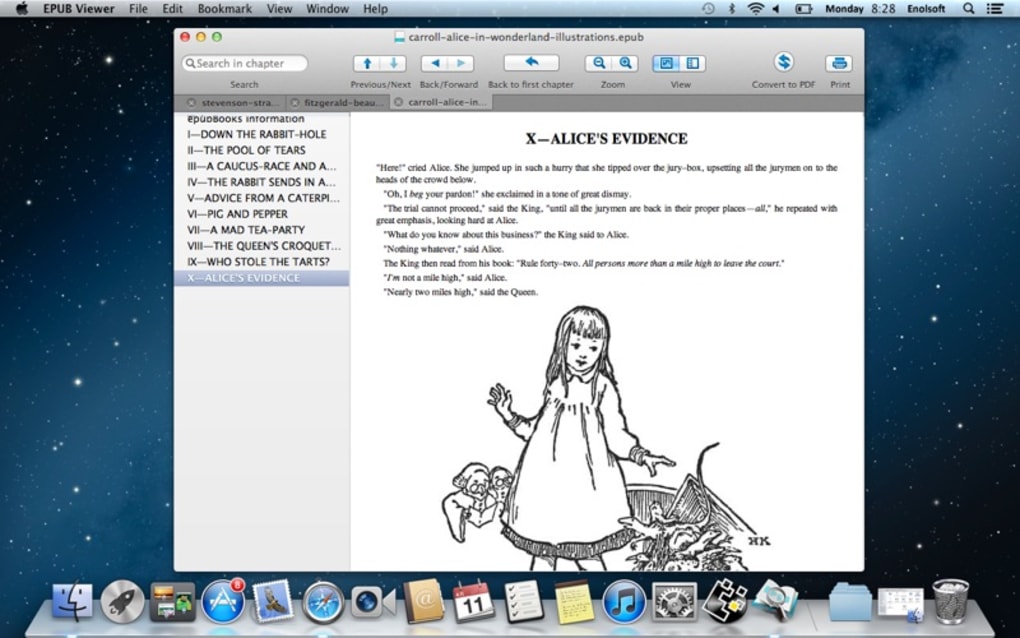
When you open EPUB Viewer for the first time, you are greeted with a clean window divided into three main panes: a left sidebar for file navigation, a central reading area, and a top toolbar with zoom, bookmark, and conversion icons. To open a book, simply drag the EPUB file from Explorer (or Finder) onto the central pane, or click the folder icon to browse manually. The book loads within seconds, and you can start reading immediately.
Zooming is handled by the “+” and “–” buttons or by using the mouse wheel while holding the Ctrl key. The bookmark icon saves your current page; a small flag appears in the left margin, and you can return to it later by clicking the bookmark list. Printing is accessed via the printer icon, which opens the standard Windows print dialog, letting you select page range, orientation, and paper size.
Operating System Compatibility
EPUB Viewer is compatible with Windows 10, Windows 11, and Windows Server editions. The macOS version supports macOS 10.15 (Catalina) and later. While a native Linux build is not offered, the application runs smoothly under Wine 6.0+ on popular distributions such as Ubuntu, Fedora, and Mint. Mobile counterparts are available for Android 7.0+ and iOS 13+. The software requires a minimum of 2 GB RAM and 200 MB of free disk space, making it suitable for older laptops as well as modern machines.
Troubleshooting Common Issues
If an EPUB fails to open, ensure the file is not corrupted by testing it in another reader. For conversion problems, verify that the source file does not contain DRM protection; EPUB Viewer does not bypass DRM. Should the application crash during PDF export, update to the latest version—frequent patches address compatibility with newer PDF libraries. Finally, if you experience UI scaling issues on high‑DPI displays, adjust the Windows “Display scaling” setting or use the built‑in “Fit to Width” option in the toolbar.
Frequently Asked Questions
Can I edit the text inside an EPUB with EPUB Viewer?
EPUB Viewer is primarily a reader and converter. It does not provide full‑scale editing capabilities such as changing paragraphs or inserting new chapters. For advanced editing, you would need a dedicated EPUB editor like Sigil or Calibre.
Is the PDF conversion lossless?
The conversion retains the original layout, fonts, images, and embedded multimedia as much as the PDF format permits. While static text and images are reproduced faithfully, interactive EPUB features (e.g., JavaScript‑based quizzes) are flattened into static content.
Does EPUB Viewer support DRM‑protected books?
No. EPUB Viewer can only open DRM‑free files. If you own DRM‑protected e‑books, you must first remove the protection with a legal tool before using EPUB Viewer.
Can I use EPUB Viewer on a Chromebook?
Chromebooks that run Linux (Crostini) can install the Windows version via Wine, though performance may vary. Alternatively, the Android app from the Google Play Store works natively on most modern Chromebooks.
Is there a limit to how many tabs I can open?
The application allows up to 20 open tabs by default, which is more than enough for typical multitasking. If you need more, you can increase the limit in the Settings menu under “Tab Management.”
Conclusion & Call to Action
EPUB Viewer delivers a compelling blend of simplicity and power for anyone who works with EPUB files on a daily basis. Its free price point, lightweight installer, and fast performance make it an attractive alternative to bulkier e‑book suites. The built‑in PDF converter, tabbed interface, and support for embedded multimedia give it a clear edge over basic readers, while the regular security updates keep your library safe. Although it lacks advanced annotation tools and cloud syncing, these omissions are outweighed by its core strengths—especially for users who prefer a desktop‑centric workflow.
If you’re looking for a secure, fast, and user‑friendly way to open, read, and convert EPUB documents, EPUB Viewer is ready for download today. Click the button below to get the latest version, install it in minutes, and start enjoying a smoother e‑book experience.







